Portable S3 security for EU clouds
•
Niels Claeys
Portable S3 security for EU clouds using JWT, OPA, and temporary credentials without hyperscaler lock-in.
At the core of most modern data platforms sits a lakehouse on S3-compatible storage. It is the central store for all organisational data, from HR to sales and beyond. As organisations grow, so does the volume and sensitivity of that data. Controlling who can access what becomes a critical concern.
US hyperscalers address this with mature solutions: fine-grained access control combined with short-lived, temporary credentials. Together, these enable strong security guarantees based on least privilege.
In contrast, many EU-based providers and on-premise solutions still lag behind. Support for fine-grained access is inconsistent, and native mechanisms for issuing temporary credentials are often missing.
This raises a fundamental question:
Can you build a data platform that is both secure and aligned with EU sovereignty requirements?
It builds on the previous parts of this series, where we developed a portable data platform on top of EU providers. If you haven’t read those yet, take a look at part 1 and part 2.
Gaps in S3 compatible storage security
A key question from the previous posts was how to securely grant access to non-tabular data (JSON, CSV, images, etc.). For tabular data, this is solved by using Lakekeeper to enforce access control at query time. Object storage, however, operates at a lower level and requires a different approach.
The first requirement is straightforward: restrict user access to specific paths within a bucket (e.g. read access to /hr-data/). This is essential for enforcing least privilege—users should only access the data they actually need.
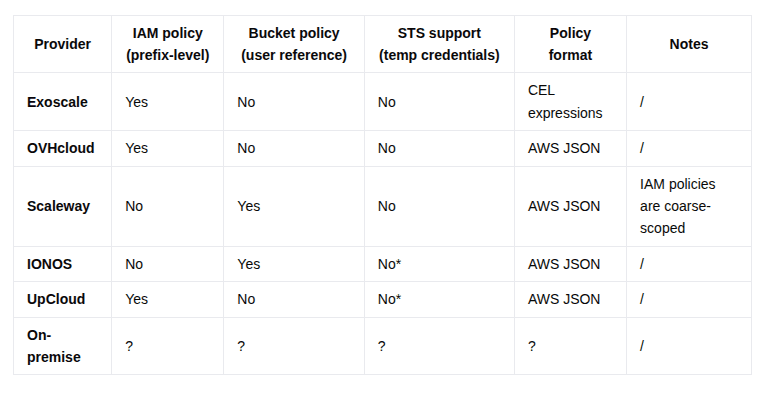
I tested several EU-based S3-compatible providers to evaluate their support for IAM policies and bucket policies. The good news: all providers now support this to some extent, using IAM, bucket policies, or a combination of both. If you want to test it out yourself, you can start from this repository. Compared to a year ago, this is a big step forward and shows they are maturing their offerings.
The second gap is more fundamental: none of these providers offer a native equivalent to AWS Security Token Service. This means there is no built-in way to issue temporary credentials. The implication is that if long-lived S3 credentials are leaked, they remain valid until manually revoked.
A third challenge is inconsistency. While all providers support access control, the implementation details differ: policy syntax, IAM models, and integration patterns are not standardized. This creates friction when building a platform intended to run across multiple providers. For teams aiming at portability, this leads to a clear conclusion: avoid tightly coupling to provider-specific permission systems.
The following table shows the differences between the EU providers:
A Portable Access Control Layer for S3
Now that we have a good understanding of the issues, let’s look at how to fix them. After evaluating a couple of options, I came to the conclusion that they are best solved by using a proxy in front of S3. The proxy validates and enforces access before forwarding requests to the S3 backend. After looking online, I only found one project, from someone at VITO, that implemented the same ide. However, I was not convinced about the code so I decided to implement it myself and call it S3 Sentinel. The core responsibilities are:
S3 Sentinel logo
Authentication: The proxy validates an incoming JSON Web Token (JWT), ensuring it is correctly signed and not expired. From the token, it extracts the user identity (principal) and group memberships. This forms the basis for authorization decisions.
Authorization (policy evaluation): The proxy delegates authorization to Open Policy Agent. It sends the full request context, including: User identity and groups, S3 actions, S3 bucket, S3 path. OPA evaluates this context against defined policies and returns an allow/deny decision.
Request forwarding (credential isolation): If the request is allowed, the proxy re-signs it using its own S3 credentials and forwards it to the backend storage. These credentials are never exposed externally.
Response handling: The response from the S3 backend is returned transparently to the user, with no leakage of internal credentials or implementation details.
Security properties and design considerations
No direct S3 access: End users never receive S3 credentials and cannot bypass the proxy. All access is funneled through a single control point.
Credential isolation: The S3 access key and secret remain confined to the proxy. Even if a client is compromised, backend storage credentials are not exposed.
Fine-grained, policy-based access control: Each request is evaluated dynamically using a policy engine, enabling strict enforcement of least privilege at the object/path level.
Portability across providers: Authorization is implemented at the platform layer rather than relying on provider-specific IAM or bucket policy models. This avoids lock-in and smooths over inconsistencies between EU S3-compatible providers.
Pluggable policy engine: While Open Policy Agent is used here, the architecture is not tied to it. Alternatives like Apache Ranger, Cedar,... could easily be included.
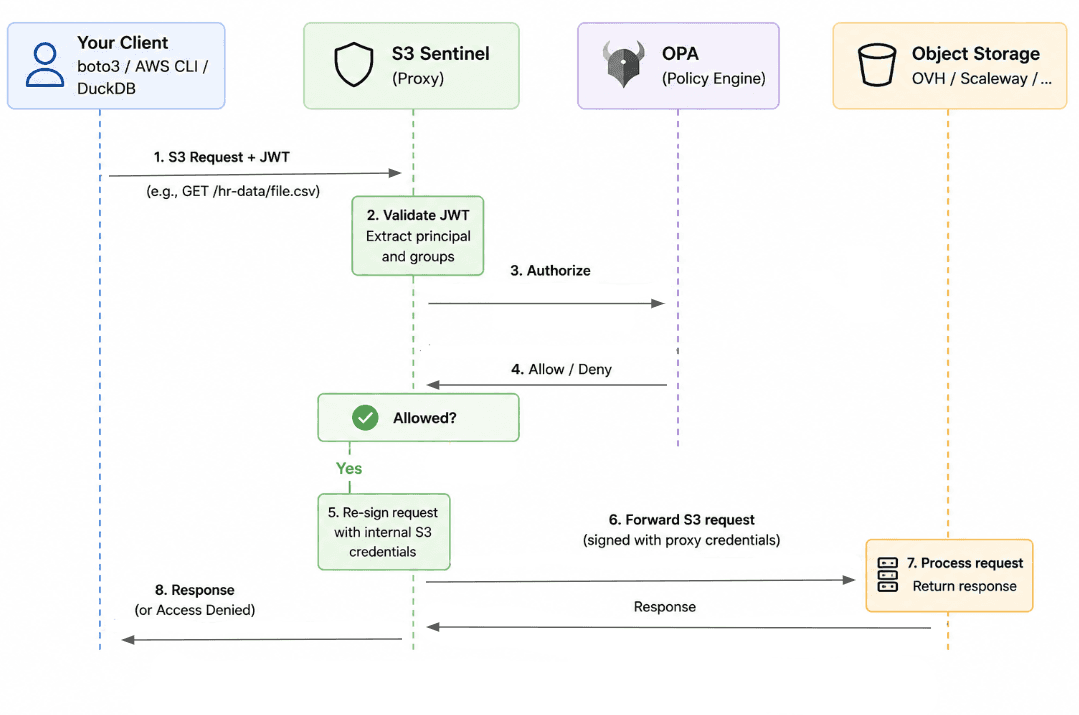
Flow for interacting with data on S3 using jwt token
Bridging to Standard S3 Clients with STS
The proxy-only flow requires clients to pass an JWT bearer token as a custom header with every request. Most S3-native tools (e.g. DuckDB, Spark, Terraform,…) don’t have the concept of a JWT header but rather use the standard AWS credential model: an access key, a secret key, and optionally a session token.
STS bridges these two worlds. A client exchanges its JWT token for standard AWS-style temporary credentials via the AssumeRoleWithWebIdentity action. From that point on, the tool needs no knowledge of OIDC at all as it uses credentials it already knows how to handle. In this model, the proxy acts as a token broker:
The client presents a JWT
The system validates it and maps it to a role
Temporary S3 credentials are issued with limited scope and lifetime
This preserves compatibility with existing tooling (e.g. boto3, DuckDB, Polars) while maintaining fine-grained, policy-driven access control. The resulting flow looks as follows:
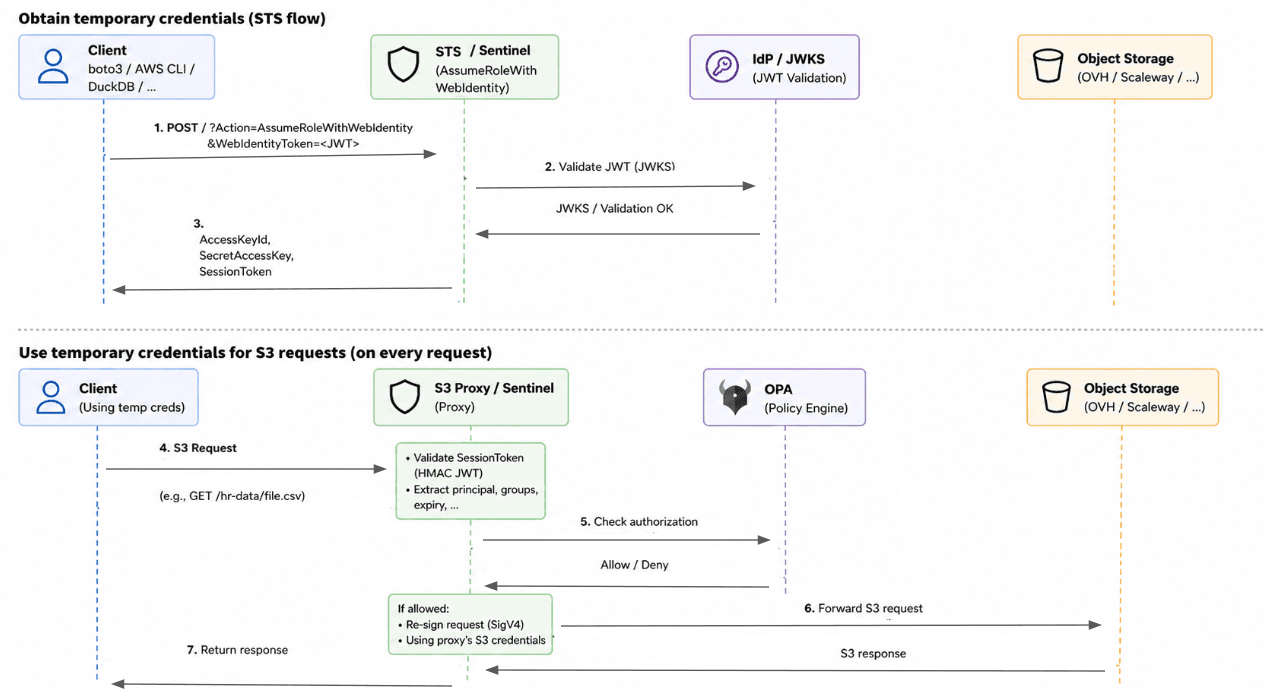
Flow for interacting with S3 using STS and temporary S3 credentials
From a purely technical perspective, we could simplify the design by embedding the JWT directly as the session token and skipping an STS compatible flow altogether. The reason why I did not choose that route is because:
Without STS credential lifecycle management becomes less robust as the refresh mechanism is not implemented. For example when running on Kubernetes you need a web identity token file with STS to refresh the S3 credentials when they expire.
Supporting STS would also allows us to support downscoping of credentials in the future.
Demo
In order to validate the theory, I created a POC to show the core logic and make sure it works end-to-end. The demo scenario can be found in the examples/basic directory in the s3sentinel repo.
Running the demo scenario is done by running docker-compose up -d.
In the demo scenario, we have two users with different group memberships (admin and reader respectively). The OPA policy defines that an admin user can do everything and the reader can only perform read operations. The rego policy is as follows:
JWT flow
The simplest way to see the proxy working is to call it directly with a JWT. The proxy accepts a JWT token and checks the user permission on every request:
STS flow
The Bearer token approach works for direct API calls but not for tools like DuckDB, Spark, or Terraform that use AWS credentials. This is where STS support becomes useful: a client exchanges its JWT for standard temporary credentials that any AWS-compatible tool can use.
To simulate that the jwt token gets written to a file, which could in the real world be sentinel login cli command, let’s use the following:
Next we specify 3 environment variables:
Then we can use any tool without specifying any custom authentication logic in our code, which makes it flexible to run in different environments. The actual code looks as follows:
Conclusion
In this post, I explored whether a data platform running on-premise or on EU-based cloud providers can reach the same security level as one built on a US hyperscaler.
The S3 Sentinel PoC demonstrates that this is achievable. The architectural pattern works, and the core implementation remains relatively lightweight (under 1000 lines of code). The real challenge lies not in the concept, but in hardening it for production because this component sits in the critical path of every S3 operation. This approach brings two key advantages:
Portability: Access control is implemented at the platform layer, removing reliance on provider-specific IAM or bucket policy implementations across EU clouds.
Improved security: Fine-grained, policy-based access control is enforced consistently, combined with temporary credentials to reduce the risk of long-lived secret exposure.
If you’re building across multiple (EU) providers or operating in a sovereign cloud context, this pattern is worth exploring. Try it out yourself, both the code and documentation are available here.
Latest
Migrating a Data Platform: 20% technology, 80% everything else
Data platform migrations rarely fail on tech, they fail on unclear success criteria, rushed discovery, and late-involved downstream teams.
Not Every Data Question Deserves a Full Data Product. And that’s okay
Why forcing every data request into a data product creates friction, and how Explorations make governed data access easier.

uv scripts: micro-production situationship
Learn how uv scripts bridge the gap between throwaway scripts and full Python projects with minimal overhead