Slaying the Terraform Monostate Beast
•
Robbert Hofman
You start out building your data platform. You choose Terraform because you want to do it the right way and put your infra in code.
There’s a lot of pressure to deliver an MVP so you go for a single state because it’s easy that you have all data available in that state. Modules, yes, but still one state.
As your platform grows, the number of projects on your platform grow, and so does your statefile. The file grows into the 100MB territory, which you have to pull every time, you start doing targeted applies, —refresh=false and —parallelism=50, just to counter the slowness. Waiting for 50k resources to refresh is no fun. The lock is always occupied, and the CI/CD pipelines are hitting API rate limits.
Time to split that giant beast.
A mental model
When using terraform, it’s always good to keep in mind that there are three representations of your resources:
1) your desired state, described by terraform code,
2) the last known state, represented by a big json document that stores the link between terraform addresses and cloud resource IDs, and
3) the current reality at your cloud provider.
In this article, we’re going from one big state file:
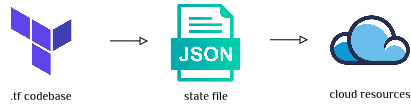
One big monostate
To many small state files:
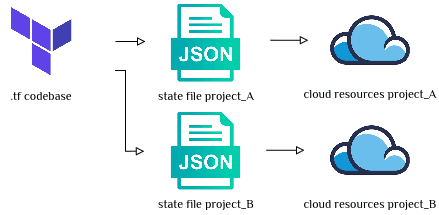
Many small project-specific states
Specifically, in the original monostate file, there are groups of resources that we want to pull out into their own separate state files.
Zero changes
During a terraform state migration, we don’t want any resources on the provider side to actually change. We want only the way we manage those resources to change. So if we have 0 changes now after terraform plan , we should have 0 changes after the migration too. That’s exactly what we’ll aim for.
On a high-level, the plan goes as follows:
Write new terraform and comment out old terraform.
Move the resources to the new state.
Comment out new code too, and plan the old state.
Plan new state.
If terraform proposes changes, you still have work to do.
Freeze
It’s probably a good idea to tell your users that in the next coming days, no changes can be made to the infrastructure, and to shift any terraform-related work to the next sprint. That’ll guarantee that at least one thing stays fixed: the resources.
Clean the monostate
The first thing you’ll want to do is make sure your current monostate is clean and nicely separates anything project-specific in a project module. These modules will become your new state files.
Your big friend here is moved blocks. It’s basically a rename of your terraform resource addresses, if they exist.
Chances are you’ll run into the limits, e.g. when you have project-dependent to addresses, in the example above: my_topic["project_a"] . You’ll have to write a script that outputs individual terraform state mv commands.
Moving state
First thing we’ll do is to pull the state to local, e.g. byterraform state pull > monostate.tfstate we effectively make a copy of the state file. We’ll also point the terraform backend tolocal instead of the usual backend (e.g. S3).
Then, we comment out the old .tf code, and write the new. In the new stack, you’ll probably need to introduce a variable to know which project you’re applying for.
Then the real magic happens like this:
For example
Which will create 3 things:
A new
project_a.tfstatefile, containing the new resource(s)An updated
monostate.tfstatefile, containing less resourcesA timestamped backup of the
monostate.tfstatefile with all resources
You probably want to script to loop over all these moves, and add a -backup=- flag so your disk doesn’t go out of space. Something like:
Then we terraform plan, and observe 0 changes.
You can then comment out the entire resource, both old and new code, switch back to the old monostate by pointing the backend to the local monostate.tfstate file again and terraform plan . That should also give you 0 changes.
When you have drained your monostate like this, and you have built all the tiny tfstate files, you can push them to your regular backend using terraform state push. For the monostate (if it has any more non-project-specific resources), that means you overwrite it, so verify that you indeed have 0 changes. It’s always good to start with moving just one project to get some experience before tackling the whole state.
Two new problems
Congratulations, you have two new problems to solve now:
1) How were you planning on applying those 200 tiny states?
terraform apply is gone now, you’ll always have to specify which project you want to apply, e.g. by terraform apply -var=project_name=project_a.
Here you have a few options, either use terragrunt, or write a terraform wrapper yourself.
After about one year in production with 200+ state files, I’m happy we chose to write our own wrapper in python. These days, it is really easy to add a [project.scripts] section in your pyproject.toml and run uv run tf apply --project myproject . What it opens up, though, is a wonderful world of customization. We can do e.g. uv run tf apply --all --filter-has-service=snowflake to run all projects that have Snowflake enabled.
2) How were you planning on sharing cross-project resource data?
This is a well known problem, and can be solved in various ways:
read from some external store (AWS SSM comes to mind),
store a shared config (e.g. YAML) alongside your .tf files, or
read from another state file.
Conclusion
There is a safe way to split state, and if your state takes more than a couple of minutes to refresh, you should probably do it. Start with notifying your users and cleaning the monostate. Then pull it to local, move the resources to their new homes, plan and iterate until you reach 0 changes locally. Finally, push the new state files to the remote and experience the joy of fast applies again.
Special thanks to Frederik Konings for the ideas for this migration strategy, and to Niels Claeys and Jan Vanbuel for reviewing this blog post.
btw we can help you with this, reach out at dataminded.com/contact
Latest

Data Platforms for humans
Data platforms fail when people are ignored. Why kindness and communication matter as much as architecture.
The Boring Stuff That Keeps You in the 5%
GenAI fails not because of models, but missing engineering, data, and product thinking. The “boring work” is what makes it real.
You Built a Data Mesh, But Your Metrics Are Still a Mess. Here’s Why.
Even with data mesh, metrics break: decentralized logic, no ownership, and cross-domain gaps. A semantic layer unifies KPIs.